
 find us
 19336
19336
Notifications
-
Important Announcement
Dear Customer, please note that NBK - Egypt will never contact you to request any personal or confidential information regarding your accounts or cards. In case this happens, please call the Call Center immediately at 19336.


 Egypt
Egypt


Notifications
-
Important Announcement
Dear Customer, please note that NBK - Egypt will never contact you to request any personal or confidential information regarding your accounts or cards. In case this happens, please call the Call Center immediately at 19336.

NBK Mobile Banking
Seamless
Banking Experience
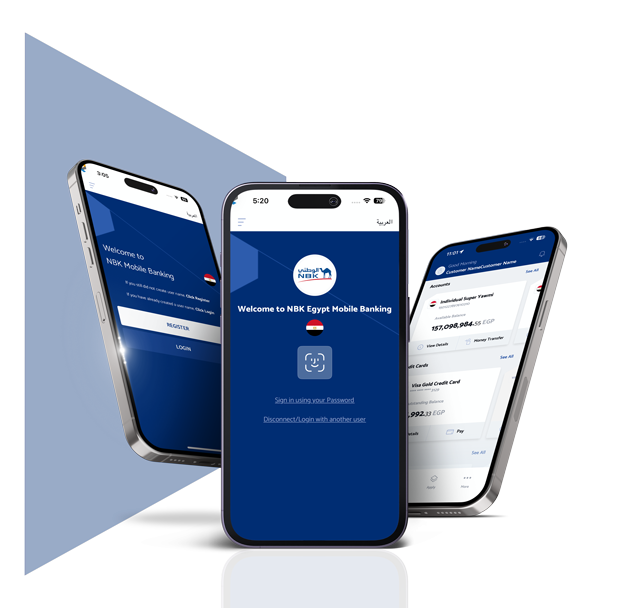
Banking made effortless. With NBK Mobile Banking, manage your accounts, cards, and transfers anytime, anywhere. Download the app now and step into smarter banking.
Manage Your
Finances Easily

Self-Registration and Management
Self-registration through the new app using your active debit or credit card without visiting the branch.


Dashboard
One dashboard. All your products. View and manage your accounts, deposits, credit cards, loans, and mutual funds all in one place.


Token Management
The in-app soft token allows you to authorize and execute transactions seamlessly, without the hassle of a separate app.


Instant Services
Transfer funds instantly between your accounts, to NBK Egypt Accounts or to other local banks using a mobile number, IPN, account number, e-wallet or debit/credit card number. In addition to international transfers, you can also view foreign exchange rates.


Cards Management
Manage your debit and credit cards, activate your cards, temporarily block/unblock them, set/reset your PIN, replace cards, view transaction history and convert eligible transactions into EPP and settle your credit card payments.


Total Investments
View your investment details, including the total balance of your current accounts, savings accounts, certificates of deposit and term deposits across all currencies.

Manage Your
Finances Easily
Self-Registration and Management
Self-registration through the new app using your active debit or credit card without visiting the branch.
Dashboard
One dashboard. All your products. View and manage your accounts, deposits, credit cards, loans, and mutual funds all in one place.
Token Management
The in-app soft token allows you to authorize and execute transactions seamlessly, without the hassle of a separate app.
Instant Services
Transfer funds instantly between your accounts, to NBK Egypt Accounts or to other local banks using a mobile number, IPN, account number, e-wallet or debit/credit card number. In addition to international transfers, you can also view foreign exchange rates.
Cards Management
Manage your debit and credit cards, activate your cards, temporarily block/unblock them, set/reset your PIN, replace cards, view transaction history and convert eligible transactions into EPP and settle your credit card payments.

NBK Egypt Products

Open a sub-account, apply for a loan, credit cards (new/ supplementary, limit increase) or USD debit card.

Personal Contact Details

Update your mobile number and email without visiting the branch.

Credentials Management

View your username and reset your password if forgotten.

View Loans Details

Access information about your loans, installments and payment schedule.

CDs and TDs Booking

Instant booking for certificates of deposits and term deposits.

Change Password

Change your current password through the app.

Mutual Funds

Request to buy and redeem mutual fund through the app.

Dormant Accounts Activation

Activate your dormant sub-accounts.

View IBAN

View your IBAN through the app.
Standing Orders

Set up standing orders and schedule automatic payments between your accounts effortlessly.
NBK Egypt Products
Open a sub-account, apply for a loan, credit cards (new/ supplementary, limit increase) or USD debit card.
Personal Contact Details
Update your mobile number and email without visiting the branch.
Credentials Management
View your username and reset your password if forgotten.
View Loans Details
Access information about your loans, installments and payment schedule.
CDs and TDs Booking
Instant booking for certificates of deposits and term deposits.
Change Password
Change your current password through the app.
Mutual Funds
Request to buy and redeem mutual fund through the app.
Dormant Accounts Activation
Activate your dormant sub-accounts.
View IBAN
View your IBAN through the app.
Standing Orders
Set up standing orders and schedule automatic payments between your accounts effortlessly.
Additional Benefits
-

Branch and ATM Locator
Find your nearest NBK Egypt branch or ATM.
-

International Transfers
Submit an international transfer request.
-

Apply Service Requests
Request a cheque book, demand draft, balance certificate or a stamped bank statement.
-
Foreign Exchange Rates
View the latest foreign currency rates.
-

Personalizing Your Experience
Re-arrange the products’ order, add a nickname, a personal photo and change color themes and privacy mode.
-

Contact Us
View the bank’s phone numbers for calls (inside/outside Egypt) or through official social media platforms.
-

Products Calculator
Calculate your loans, certificate of deposits and term deposits.
-

SMS Subscription
Subscribe to the SMS banking subscription for monthly account balance or account transaction.
-

Authentication and Notifications
Activate the log-in using face ID or fingerprint, and turn-on push notifications.
Banking Has Never
Been Easier


Enjoy
Various Benefits
With Our
New App



FAQs
The application is compatible with the following operating systems: Apple iOS 16 and Android 11.
The application is only available for individual customers.
If you need help, simply contact our 24/7 NBK Call Center on 19336 (within Egypt), +202 26149400 (outside Egypt) or 22293980 (free call from Kuwait).
The new app offers a range of services including self-registration, viewing and managing accounts, credit cards, loans, term deposits and certificates of deposits. You can instantly transfer money between your accounts and credit cards, to other NBK Egypt accounts and to local or international banks. The app also enables booking term deposit and certificate of deposit, investing in mutual funds, accessing cash on phone and EPP, opening new sub-account, managing debit and credit cards [temporary block - unblock – replace lost or stolen – view card PIN – reveal details – travel documents related to credit card], checking exchange rates and selling currency, applying for credit cards and loans, downloading account or credit card statement, updating contact details using the in-app token, biometric login and managing username, password and security settings.
Upon first-time registration, you will see two options: Register or Login. If you choose “Register” you must fill: debit/credit card number, your ID type, national ID number/ passport number, (OTP) will be sent to your mobile number, enter the one-time password (OTP) sent to the bank's registered mobile phone number, enter card PIN.
These requirements must be filled: username, password and confirm password.
Download the latest version of the application.
On selecting “Forget Username” you must fill:
Debit/credit card number and card PIN.
After clicking “Next”: OTP will be sent to your registered mobile number, a Pop-up message will display: “OTP was sent to your mobile number, Enter the OTP (max 3 attempts) If correct, username will be displayed.
Upon selecting “Forget Password” you must fill: Username, Debit/credit card and card PIN. After clicking “Next”, OTP will be sent to your mobile number registered with the bank, A pop-up message stating: “OTP has been sent to your mobile number.” Will appear, Enter OTP (max 3 attempts) and if correct, you’ll be redirected to enter new password. Write new password and Confirm password.
After a successful login, click on profile settings, tap on “Enable Biometric” and enter the received OTP.
Review and accept the terms and conditions to proceed, biometric authentication is now successfully enabled for your account.
A security code created within the mobile banking app to verify your identity and authorize all third-party transfers and some other banking activities.
From the Profile Page choose Token management and activate the Token, Enter the one-time password (OTP) sent to your mobile number registered with the bank and enter the activation code sent to your mobile number registered with the bank, create a (Soft Token PIN) and enter it again for confirmation, a message will confirm that the soft token has been activated then you will receive a text message stating that the soft token has been activated.
If you want to add a “Local beneficiary” for account-to-account transfer the following fields must be filled: Full Name, Nickname, Bank name, Account number or IBAN and Currency.
After clicking “Next” you must enter the soft token.
If the token is valid, beneficiary will be added successfully and if you want to add an “International Beneficiary” for transferring outside Egypt the following fields must be filled: beneficiary name, nickname, beneficiary address, city, street address, bank name and swift code, account number or IBAN and currency.
After clicking “Next” you must enter soft token.
You can add, modify and delete any beneficiary.
You can open a new sub account by selecting your desired account type all current and saving accounts will be displayed and the following information will be required:
Currency (Will be displayed based on account type), Accept the terms and conditions.
Conditions for opening new suffix:
It must be the same currency, for local currency it can be debited from any foreign account currency but from local currency to foreign currency is not permitted.
From the dashboard, choose the account or credit card then click on statement, you can view the statement, download it from download icon and you can review results by editing the dates (From -To).
Debit Cards:
Activate, set and reset card PIN, temporary block and un-block, replace stolen or lost card and reveal card details.
Credit Cards:
Activate, set and reset card PIN, temporary block and un-block, replace stolen or lost card and reveal card details and “Before Travel” fill in the request to notify the bank to avoid blocking or declining the transactions during the travelling duration.
From the dashboard, choose the credit card you want to settle, click on “payment” then choose the account that will be deducted from, the payment amount and a confirmation message will appear stating that the credit card has been paid successfully.
Convert any credit card transaction of EGP 500 or more into easy instalments with our Easy Payment Plan feature.
Steps: From the dashboard, choose the credit card you want to pay for, click on 'Easy Payment Plan”, Select the specific transaction, choose the desired instalment periods and accept the terms and conditions to proceed.
A confirmation screen will appear displaying all entered details.
Enter your token PIN to authorize and complete the transaction.
A confirmation message will appear indicating that “the transfer was successful.”
You will receive an SMS notifying you of the amount debited from your credit card.
A request made through the application to get a specific banking service. Request to issue a cheque book, a demand draft, a balance certificate, an SMS banking service subscription or a bank statement.
From the dashboard, choose the “profile Setting”, tap on “update contact information”, tap on “update mobile number”, enter Soft Token PIN for confirmation, insert new mobile number, tap on “Update”, and proceed with confirmation message, enter the verification code (OTP) that you received on your mobile number, you will receive two SMS messages, one on the old number and another SMS on the new number and you will receive an SMS to notify you that the action has been taken.
From the dashboard, tap the “profile setting”, tap on “update contact information”, tap on “update email”, enter soft token for confirmation, insert new email and tap on “update”, proceed with confirmation message, enter verification code sent to the new email and SMS will be received that email has been updated.