 Find Us
 1801801
Notifications
-
Official Sources of NBK Information
With the increasing use of artificial intelligence technologies and the ease with which they can be used to create or manipulate content in ways that may appear authentic, we would like to emphasize the importance of verifying the accuracy of any news or information attributed to National Bank of Kuwait or any of its employees. We reiterate that the Bank’s official channels are the authorized source of information and news relating to NBK and its employees, and strongly advise our customers not to rely on or circulate any content attributed to the Bank or its employees that has not been issued through its official channels. NBK remains committed to upholding the highest standards of transparency and disclosure and to providing its customers with accurate and reliable information through its official channels.
-
Closure of Some Branches
As a precautionary measure, please note that the Kuwait International Airport (T1) and Public Institution for Social Security (PIFSS) branches are closed until further notice. We will be pleased to serve you at the nearest available branch. All banking services remain available through NBK Self-Service Branches, the Call Center, and all electronic channels.
-
Beware of Fraud
NBK never asks for your card number, OTP, PIN, CVV or any personal information over the phone, SMS, email, WhatsApp or any similar app. Do not disclose your information to anyone. Learn More


Notifications
-
Official Sources of NBK Information
With the increasing use of artificial intelligence technologies and the ease with which they can be used to create or manipulate content in ways that may appear authentic, we would like to emphasize the importance of verifying the accuracy of any news or information attributed to National Bank of Kuwait or any of its employees. We reiterate that the Bank’s official channels are the authorized source of information and news relating to NBK and its employees, and strongly advise our customers not to rely on or circulate any content attributed to the Bank or its employees that has not been issued through its official channels. NBK remains committed to upholding the highest standards of transparency and disclosure and to providing its customers with accurate and reliable information through its official channels.
-
Closure of Some Branches
As a precautionary measure, please note that the Kuwait International Airport (T1) and Public Institution for Social Security (PIFSS) branches are closed until further notice. We will be pleased to serve you at the nearest available branch. All banking services remain available through NBK Self-Service Branches, the Call Center, and all electronic channels.
-
Beware of Fraud
NBK never asks for your card number, OTP, PIN, CVV or any personal information over the phone, SMS, email, WhatsApp or any similar app. Do not disclose your information to anyone. Learn More
 Kuwait

NBK Mobile Banking
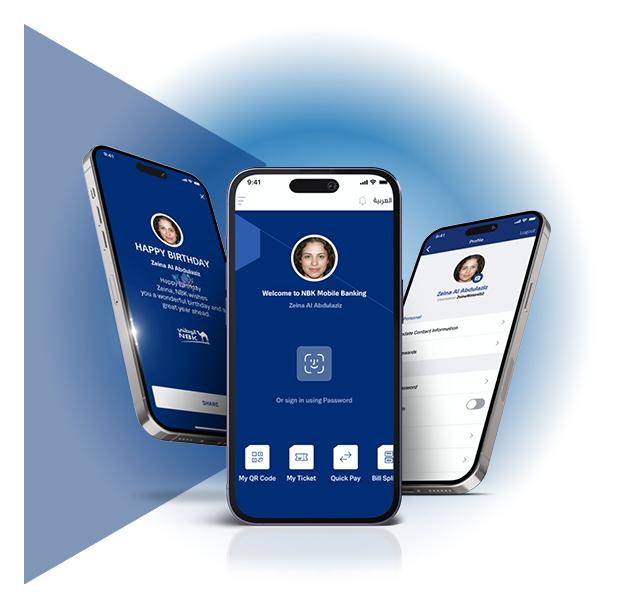
A New Experience
Tailored For You
The new NBK App is here and it is all about you. Enjoy a personalized login and dashboard experience, faster transactions, new profile center and much more.
Manage Your Finances
In Your Own Way

You Can Become a Customer Easily
Joining us as an NBK Customer has become faster and easier now. Open your NBK Account with simpler steps via NBK Mobile Banking App.

WAMD
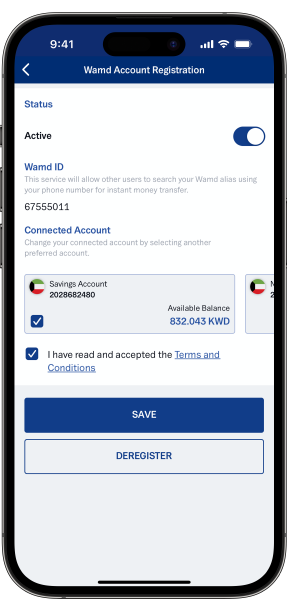
Send and receive money instantly using a mobile number.

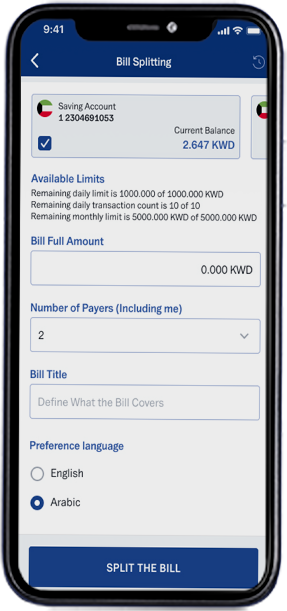
Bill Splitting
Split the bill with up to 20 users with NBK Bill Splitting.
NBK Savings Account
With NBK Savings Account, you can earn interest with the ability to withdraw from the account and transfer your money at the same time.
Open your account today via NBK Mobile Banking App.

NBK Deposits
Easily open any of NBK Deposit Accounts, such as NBK Term, Flexible Term or Partial Withdrawal Deposit.

Manage Your Finances Easily
With NBK Mobile Banking
You Can Become a Customer Easily
Joining us as an NBK Customer has become faster and easier now. Open your NBK Account with simpler steps via NBK Mobile Banking App.
WAMD
Send and receive money instantly using a mobile number.
Bill Splitting
Split the bill with up to 20 users with NBK Bill Splitting.
e-Payments
With e-Payments, you can pay phone bills, purchase your e-cards for video games and PlayStation and much more.
NBK Savings Account
With NBK Savings Account, you can earn interest with the ability to withdraw from the account and transfer your money at the same time.
Open your account today via NBK Mobile Banking App.
NBK Deposits
Easily open any of NBK Deposit Accounts, such as NBK Term, Flexible Term or Partial Withdrawal Deposit.

Get Your Credit Card Digitally

Get Your
Credit Card Digitally
Activate your digital signature on Kuwait Mobile ID and get a Credit Card via NBK Mobile Banking anytime, anywhere, without visiting a branch.

Get Your Loan Digitally
Get
Your Loan Digitally
Activate your digital signature on Kuwait Mobile ID and get a Consumer, Housing or Auto Loan via NBK Mobile Banking anytime, anywhere, without visiting a branch.
NBK Products
NBK Products
Easily open an account, apply for a loan, credit or prepaid card in few clicks.
Contact Details
Contact Details
Update your personal information through NBK Mobile or Online Banking without visiting the branch.
Certificates and Statements Request
Certificates
and Statements Request
Request certificates and statements with a QR code for official use.
Cash Advance
Cash Advance
Transfer money from your credit card to your account easily and faster.
Managing Cards
Managing Cards
During Travel
Avoid declined transactions when traveling abroad by notifying NBK about your travel ahead of time.

Cards and Accounts Activation
Activation
Activate new NBK Credit, Debit or Prepaid Cards and dormant accounts.
Transfer Limit Increase
Transfer
Limit Increase
You can increase your monthly transfer limit from KD 2,000 up to KD 25,000.
Standing Orders
Standing Orders
Establish standing orders with automatic payments between accounts or for recurring bills.
Prepaid Card Load
Prepaid
Card Load
Load or unload NBK Foreign Currency Prepaid Card.
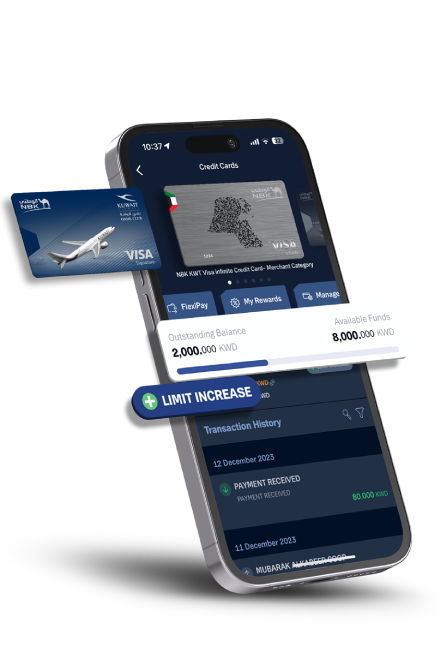
Credit Card Limit Increase
Credit Card
Limit Increase
Increase your credit card limit simply by signing the Ci-Net consent form electronically with a few easy and simple steps.
Get Your Credit Card Digitally
Get Your
Credit Card Digitally
Activate your digital signature on Kuwait Mobile ID and get a Credit Card via NBK Mobile Banking anytime, anywhere, without visiting a branch.
Get Your Loan Digitally
Get
Your Loan Digitally
Activate your digital signature on Kuwait Mobile ID and get a Consumer, Housing or Auto Loan via NBK Mobile Banking anytime, anywhere, without visiting a branch.
NBK Products
NBK Products
Easily open an account, apply for a loan, credit or prepaid card in few clicks.
Contact Details
Contact Details
Update your personal information through NBK Mobile or Online Banking without visiting the branch.
Certificates and Statements Request
Certificates
and Statements Request
Request certificates and statements with a QR code for official use.
Cash Advance
Cash Advance
Transfer money from your credit card to your account easily and faster.
Managing Cards
Managing Cards
During Travel
Avoid declined transactions when traveling abroad by notifying NBK about your travel ahead of time.
Cards and Accounts Activation
Activation
Activate new NBK Credit, Debit or Prepaid Cards and dormant accounts.
Transfer Limit Increase
Transfer
Limit Increase
You can increase your monthly transfer limit from KD 2,000 up to KD 25,000.
Standing Orders
Standing Orders
Establish standing orders with automatic payments between accounts or for recurring bills.
Prepaid Card Load
Prepaid
Card Load
Load or unload NBK Foreign Currency Prepaid Card.
Credit Card Limit Increase
Credit Card
Limit Increase
Increase your credit card limit simply by signing the Ci-Net consent form electronically with a few easy and simple steps.
Additional Benefits
-

Safety and Security
Report lost or stolen NBK Card with issuance of a replacement instantly.
-
Cardless Withdrawal
You or a beneficiary of your choice can withdraw cash from any NBK ATM or CDM with Civil ID or mobile number.
-

View Earned Points
You can easily view and redeem your accumulated NBK Miles Points, Rewards Points, Goal Points and KWT Points.
-

Investment Transfers
Easily transfer to your NBK Brokerage Account and NBK Invest Account.
-

Confirm Payments
You can confirm all online payment transactions directly and easily through the app without the need to enter the OTP.
-

Digital Branch Queue Number
Get your digital queue number prior to arriving to NBK Branches through "My Ticket" on NBK Mobile Banking App.
-
Block and Unblock Cards
You can temporarily block your cards and unblock them.
-

Branch Locator
Easily find your nearest NBK Branch, ATM or CDM across Kuwait.
-
Contact Us
Contact us by calling from inside and outside Kuwait or through our social media networks.
-


Using the App
on Smartwatch
You can use the app on Android and iOS smartwatches. Simply download the latest version of NBK Mobile Banking App and pair it with your smartwatch to enjoy the new features, like: view your account or credit card balance, view the last 5 transactions on your account or credit card and check the foreign exchange rate from Kuwaiti Dinars to other currencies.
Enjoy
Various Benefits
With NBK Mobile
Banking


FAQs
To avoid delays in money transfer or request additional information, please follow the below tips:
• Refrain from using abbreviations, codes or nicknames in the "Details" field of your payment order
• Make sure to fill in the full details of "Purpose of Payment"
• Add the beneficiary’s full name and address, including the city and country
You can register your NBK Mobile Banking account on up to 3 devices. You can also manage the number of devices registered to the service by tapping on your profile then "Device Management".
Yes, you can log into the app using your touch or face ID, but first you need to activate the option on your mobile.
• We will not ask you to save your personal details on the device when using the app
• Your password won't be saved on your device
Once you are registered on NBK Mobile Banking, you will get a transfer limit of KD 2,000 monthly and you can increase it up to KD 25,000.
• Go to “Transfers”, then “Monthly Transfers Settings”
• Select the requested monthly transfer limit
• Customers have the option of KWD 2,000, KWD 5,000, KWD 10,000, KWD 20,000, and KWD 25,000
• Once the amount is selected, the customers have to agree on the Terms and Conditions and tap on “CONTINUE”
• The One Time Password (OTP) will be sent on the method the customers select, whether SMS or email then tap on “CONFIRM”
• Enter the OTP and tap on “VERIFY”
• The monthly transfer limit is updated
• Daily limit: KD 3,000
• Daily transactions: 10
• Monthly limit: KD 10,000
• Daily limit: KD 1,000
• Daily transactions: 5
To change the display of the account balance:
• Tap on your profile
• Swipe up the “Settings”
• Tap on "Smartwatch"
• Select “Show Account Balance and Transaction” and choose one account to be displayed. You can have it displayed in either "Percentage Value" or "Amount" form. Do the same for the credit card by selecting “Show Credit Card Balance and Transactions”
• Tap on “ACCEPT”
You can only display one account or credit card. If you need to view another account or credit card, you must click on the account or credit card you desire to be displayed.
To activate NBK Geo Alerts, go to your profile in the NBK Mobile Banking App, swipe up to “Settings”, and scroll to "Enable NBK Geo Alerts".
Enable the service by tapping the “Enable NBK Geo Alerts” box, then agree to the Terms and Conditions and click on “ACCEPT”.
To deactivate NBK Geo Alerts, go to your profile in the NBK Mobile Banking App, swipe up to “Settings”, scroll to " NBK Geo Alerts", then disable the service by removing the check mark from the “Enable NBK Geo Alerts” box.
If you are not registered yet, ensure to downloaded the latest version of the app and follow the on-screen instructions.
Yes, you can save the trip to the branch and do the updates through the application from the comfort of your home, office or abroad.
WAMD is a service provided by K-Net on NBK Mobile Banking App, where users can easily send and receive money locally.
Kuwaiti Dinar is the currency used for WAMD across all local banks.
• KD 1,000 is the maximum limit per transaction
• KD 3,000 daily limit
• KD 20,000 monthly limit
Log in to the NBK Mobile Banking App, go to "Transfers", then “Transfers Settings” and tap on “WAMD”. You can select the settlement account or deregister to the service in simple taps.
